Path Elements
A BLine path is an ordered list of translation anchors plus optional rotation targets and events between them.
Build the mental model
Think of a path as two layers:
- Anchors draw the route. BLine drives from one translation anchor toward the next, so each anchor can introduce a new straight segment.
- Segment elements schedule behavior by geometric progress. Rotation targets and events sit between anchors without bending the route.
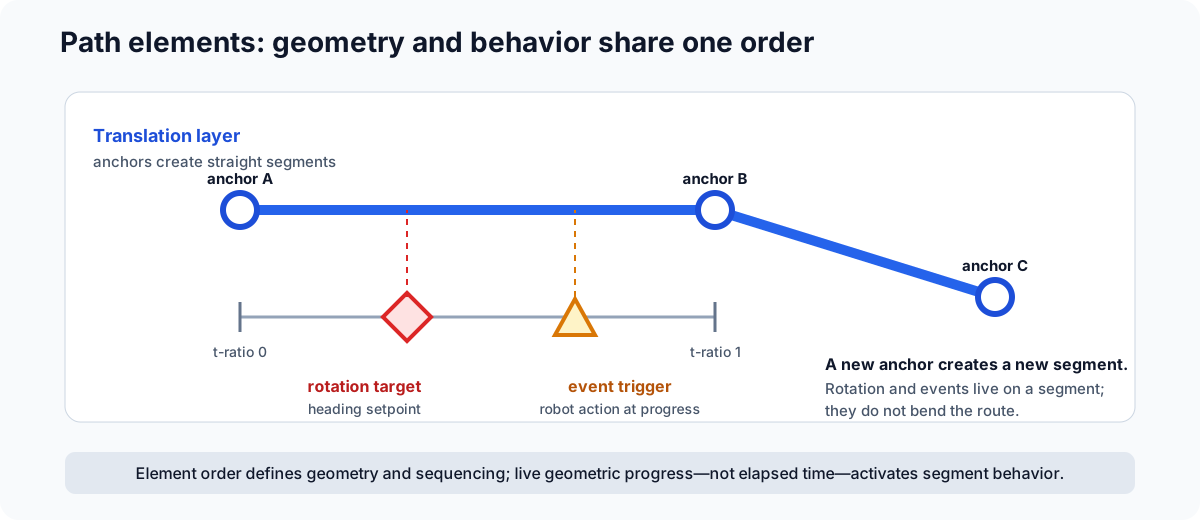
The path elements define shape and sequencing, but they do not create a time schedule. Maximum-translation-velocity ranged constraints determine how aggressively the robot travels through each part of that shape.
Element summary
| Element | Contains | Use it for |
|---|---|---|
| Waypoint | Position and rotation | A point where both field position and heading matter |
| Translation Target | Position | Shaping the route without introducing a new heading target |
| Rotation Target | Rotation and t_ratio |
Changing heading at a position along a translation segment |
| Event Trigger | Library key and t_ratio |
Starting robot behavior as geometric progress passes a marker |
Waypoints and translation targets are anchors. Rotation targets and event triggers are segment elements: their t_ratio places them between surrounding anchors.
Waypoint
A waypoint combines a translation target and rotation target.
new Path.Waypoint(
    new Translation2d(6.2, 3.1),
    Rotation2d.fromDegrees(90)
)
Use a waypoint when heading has meaning at that location, especially at the start or end of a scoring move. Do not use one merely because you need the path to bend; a translation target is clearer when rotation should continue from another target.
In BLine Web, select a waypoint to edit X, Y, Handoff Radius, Rotation, and Profiled Rotation.
Translation target
A translation target shapes the polyline without adding a heading target.
new Path.TranslationTarget(new Translation2d(7.4, 4.0))
Use translation targets to:
- route around a field feature;
- approximate a curve;
- create a ranged-constraint boundary for local translation constraints; or
- build a one-target drive-to-position command that holds the current heading.
The optional handoff radius controls when the follower may advance to the next anchor. The final anchor is completed by tolerance rather than an intermediate handoff.
For most pass-through intermediate targets, enable t-ratio-based translation handoffs on the FollowPath.Builder. That mode advances on circle entry or sufficient projected segment progress, which avoids steering backward toward a missed circle. Keep radius-only behavior when the robot must physically visit the anchor.
Rotation target
A standalone rotation target changes heading along a translation segment without changing the route.
new Path.RotationTarget(
    Rotation2d.fromDegrees(135),
    0.55,
    true
)
t_ratio = 0 is the beginning of the segment and t_ratio = 1 is the end. BLine Web labels this field Rotation Pos (0-1).
- Profiled rotation interpolates from the prior rotation target as the robot progresses.
- Non-profiled rotation exposes the full new target when it becomes active.
Java and hand-authored JSON have different omission defaults
The common Java RotationTarget constructor defaults profiled rotation to true. If hand-authored JSON omits profiled_rotation, BLine-Lib v0.9.1 reads it as false. Write the field explicitly in JSON.
Event trigger
An event trigger identifies a registered robot action and a geometric segment position.
new Path.EventTrigger(0.65, "deployIntake")
The trigger fires once when the robot's projection onto the segment passes its t_ratio; it does not wait for the robot center to touch a screen marker.
Keep event triggers in ascending t_ratio order within a segment. The runtime processes them in path order and stops at the first marker not yet reached.
See Events for registration, command scheduling, and requirement conflicts.
Valid ordering
Use these rules when building paths in code or JSON:
- The first and final elements should be a waypoint or translation target.
- A standalone rotation target or event trigger must belong between translation anchors.
- Keep rotation/event markers ordered by their
t_ratiowithin the segment. - Avoid consecutive anchors at exactly the same position unless a tested behavior specifically needs a degenerate segment.
- A one-element path should contain a waypoint or translation target, never only an event or rotation target.
BLine Web enforces the allowed first/last element types when adding or converting elements.
Draw a curve
BLine Web's Add curve action records a field stroke, simplifies it, and inserts up to 18 translation targets. It also creates automatic maximum-velocity ranged constraints across the inserted ordinal span.
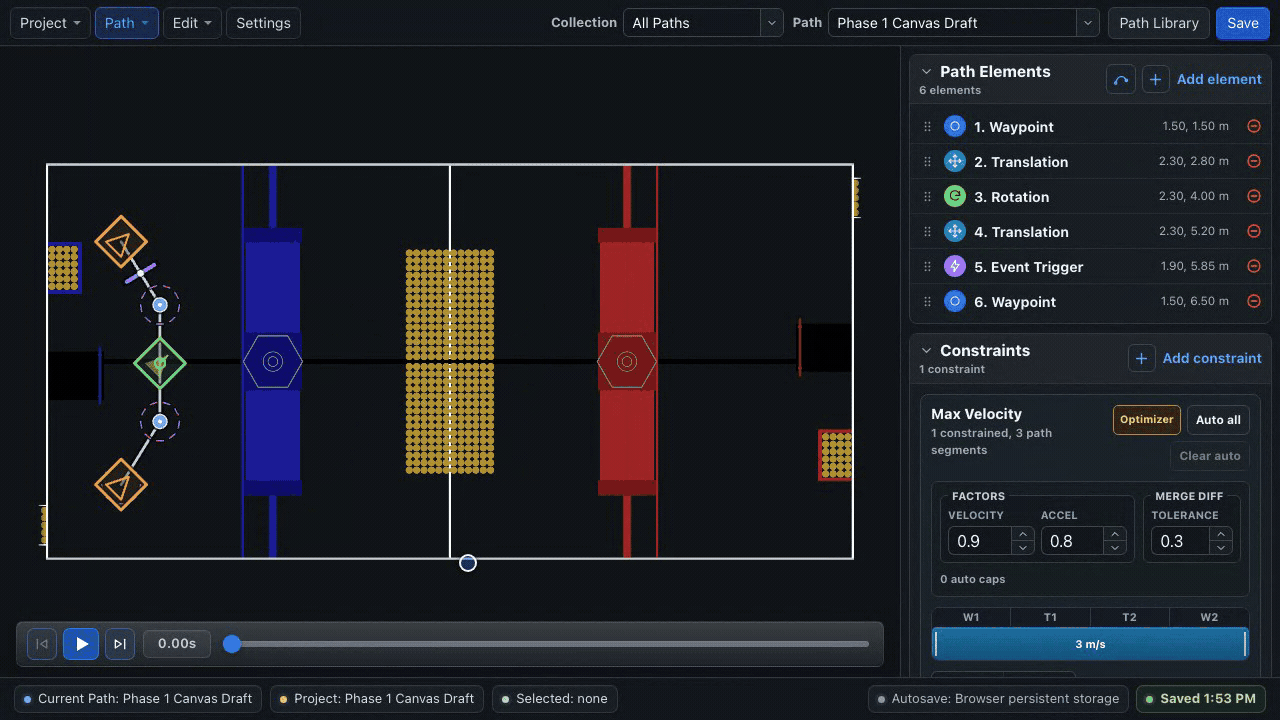
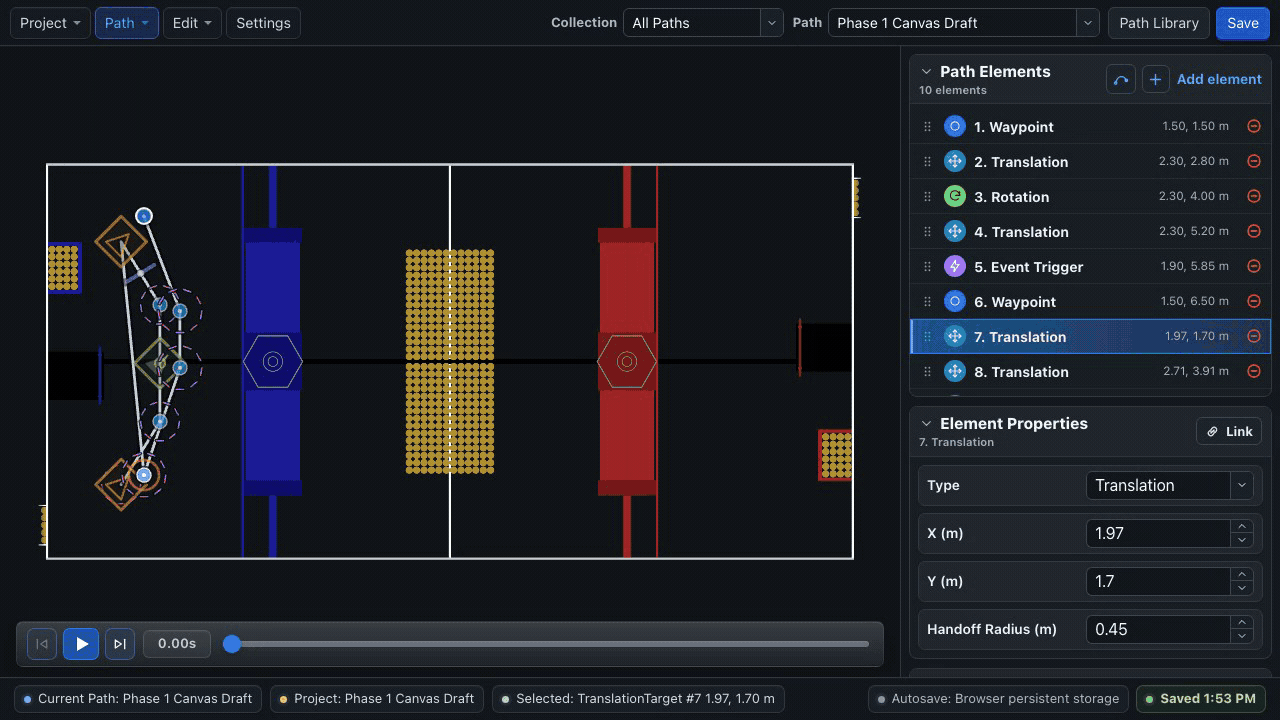
The result is ordinary editable BLine geometry. Remove unnecessary targets, then treat the maximum-velocity caps as part of authoring:
- inspect the automatically created caps;
- run or refresh the optimizer after changing the anchors;
- review where the path slows for each direction change;
- simulate; and
- test incrementally on the robot.
More anchors do not automatically make a better curve. Every added anchor creates another handoff and another place where the local velocity plan may need review.
Reuse geometry with linked elements
Collections organize paths; linked elements keep shared positions synchronized. A linked translation or waypoint can be used by multiple paths, such as a common scoring pose or route handoff.
Linked-element identities are editor metadata. BLine-Lib still receives independent path JSON files with ordinary element coordinates. See Linked Elements.
Example path
Path pickup = new Path(
    new Path.Waypoint(
        new Translation2d(3.0, 2.0),
        Rotation2d.fromDegrees(0)
    ),
    new Path.TranslationTarget(new Translation2d(5.5, 2.8)),
    new Path.RotationTarget(Rotation2d.fromDegrees(45), 0.5, true),
    new Path.EventTrigger(0.7, "startIntake"),
    new Path.Waypoint(
        new Translation2d(7.2, 3.6),
        Rotation2d.fromDegrees(90)
    )
);
The route is defined by three anchors. Rotation and intake behavior happen along the second translation segment without adding corners. Before testing, use the optimizer as an initial velocity plan and review whether the middle anchor needs a lower cap.